Free · Live sound · for the Allen & Heath CQ12
The CQ12 Vocal Cheat-Sheet
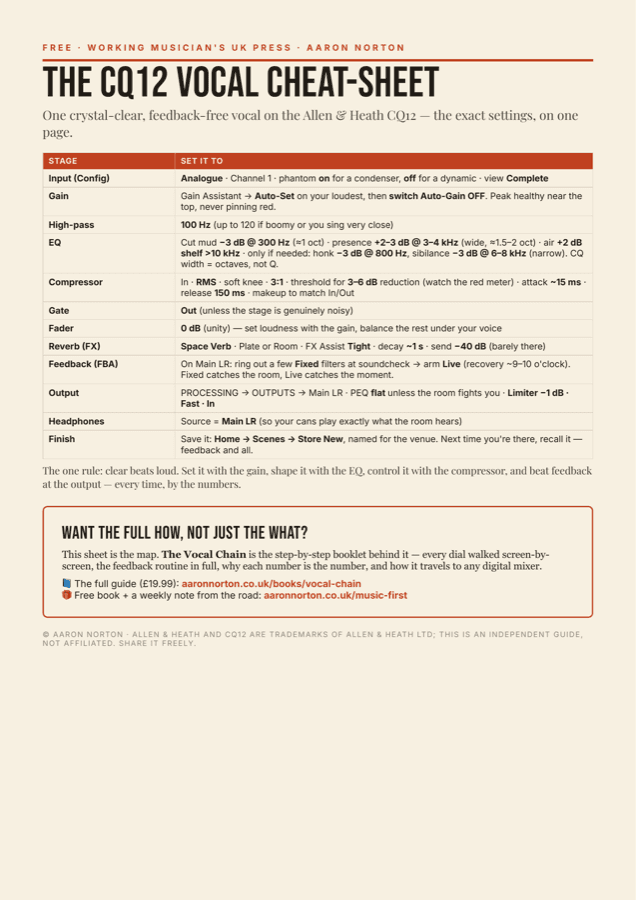
One crystal-clear, feedback-free vocal on the CQ12 — the exact gain, EQ, compression, reverb and Feedback Assistant settings, on a single page you can print and tape to your case.
No “a bit of this, to taste” — real numbers. Pop your email in and it's yours, plus a copy lands in your inbox.
Free download
Where shall I send it?
Enter your email and the cheat-sheet is yours instantly — no charge. You'll also join The Independent Musician's Library, my notes on the craft of making a living from music. Unsubscribe any time.
The sheet is the map. The book is the how.
The cheat-sheet gets you a great vocal fast. The Vocal Chain is the step-by-step booklet behind it — every dial walked screen-by-screen, the full feedback routine (Fixed at soundcheck, Live armed for the gig), why each number is the number, and how it travels to any digital mixer.
Built at my own desk on a CQ12, for solo singers, singer-guitarists and anyone fronting their own sound.
CQ12 vocal questions, answered
What are the best vocal settings on the Allen & Heath CQ12?
Set your level on the input gain (use the Gain Assistant), not the fader. Add a high-pass around 100 Hz, a small cut around 300 Hz to clear mud, a presence lift of about 2–3 dB at 3–4 kHz so the words cut through, gentle compression around 3:1 for 3–6 dB of gain reduction, and a limiter at −1 dB on the Main output. The free CQ12 Vocal Cheat-Sheet lists every number on one page.
How do I stop my vocal feeding back on the CQ12?
Use the CQ12's Feedback Assistant in two passes: ring out a few Fixed filters at soundcheck to tame the room, then arm the Live filters to catch anything during the gig. Set your level with the input gain rather than pushing the fader, and aim for a clear vocal rather than a loud one. The cheat-sheet walks the full feedback routine step by step.
What EQ should I use for live vocals on the CQ12?
Cut mud around 300 Hz, cut boxiness around 800 Hz only if you need to, boost presence 2–3 dB around 3–4 kHz, and add a gentle air shelf above 10 kHz. On the CQ, EQ width is shown in octaves rather than Q — use a wide band to boost and a narrow band to cut.
Will these settings work on the CQ12T, CQ18 or other digital mixers?
Yes. The CQ12, CQ12T, CQ18 and CQ20B share the same controls, and any digital mixer with a gate, EQ, compressor, reverb, limiter and feedback control uses the same names in the same order — so the numbers carry straight across.
I'm a solo singer running my own sound — is the CQ12 right for me?
It's ideal for it. Set the vocal once by the numbers, save it as a Scene named for the venue, and recall it next time — feedback filters and all. The whole point is that you stop relying on a sound engineer to sound good.